Evaluate
Videos, stories, and tools about why and how to be critical of information found online.
How to tell what’s true online (0:40 min)
Published by MediaSmarts on May 28, 2020
How to Fact-Check Online Sources | Authentication 101 (2:02 min)
Published by Media Smarts on September 18th, 2020
Getting the Goods on Health and Science (1:54 min)
Published by Media Smarts on September 24th, 2020
Why it is important to evaluate and be critical of health information online: This NATURAL TRICK can CURE YOUR CANCER (2 min)
Published by McGill Office for Science and Society on Jul 3, 2018

Use
Short videos on what to do with the information you find.
How to Bookmark a Website in Google Chrome (1:21)
Published by MDTechVideos on Jan 1, 2017
3 Ways to take a screenshot on Android phones (1:53)
Published by PCWorld on Jan 30, 2018
How to Take a Screenshot on iPhone or iPad (with a Home button) (1:15)
Published by Digital Trends on Oct 2, 2016
iPhone X: How to Take Screenshot (without a Home button) (2:12)
Published by iLuvTrading on Feb 20, 2018
How To Take A Screenshot On A PC (with a Microsoft Windows operating system) (1:16)
Published by Digital Trends on Nov 7, 2017
Note
Technologies and devices change rapidly.
The YouTube channels such as Microsoft Customer Support and Apple Support could help you keep updated with new devices and techniques.
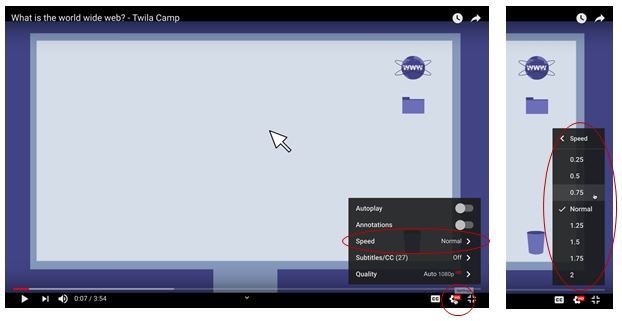
How to slow down a video?
YouTube allows you to slow the videos down when needed. Look for (Settings) to change the speed from “Normal” to “0.75” or “0.5”, as in this example.